What is an order ticket?
By MichaelUpdated August 27, 2026
An order ticket is the panel a trader places orders from. It carries the order type, the price, the size and the side, and submits the instruction to the exchange. Everything about how a trade enters the market is decided here, before anything is sent.
How does an order ticket work?
A ticket collects four things: which market, which side, how much, and at what price. Once those are set, one button sends the instruction and the exchange does the rest.
The reason it is more than a form is that the same trade can be entered many different ways, and the way it is entered changes the result. Buying one bitcoin can mean crossing the spread immediately, resting a bid and waiting, or feeding the order into the market over an hour. All three end with the same position and none of them cost the same.
That gap is called execution. It is the difference between the price a decision was made at and the price the trade actually happened at, and over enough trades it is large enough to matter more than most people expect. The order ticket is where it gets decided.
Market or limit?
Two order types cover most trading, and they trade the same two things against each other.
A market order crosses the spread and takes whatever is resting in the order book. It fills immediately, and the price is whatever the book gives you. In a liquid market that is barely worse than the screen price. In a thin one, or in a large size, it can be much worse, because the order eats through several price levels to complete.
A limit order names a price and waits. It never fills worse than the price you set, and it might not fill at all. You have traded certainty of execution for certainty of price.
Which is right depends entirely on what the trade is. If the reason for the trade is that something is happening right now, a limit order that misses is worse than a market order that pays the spread. If the trade is patient, resting a limit and being paid the spread rather than paying it is free money over enough repetitions.
Most venues also let a limit order be marked so it can only ever rest, never take. That guarantees the passive side of the trade, at the cost of the order being rejected if it would have filled immediately.
What is an execution algorithm?
An execution algorithm is an order that works itself over time instead of being sent once. Rather than a single instruction, it is a job the platform runs, placing and repricing orders on your behalf until the size is done.
The reason they exist is size. A large order sent at once does two things wrong. It moves price against itself, because it consumes the book, and it announces itself, because everyone watching the tape sees an unusual print and reacts. An algorithm addresses both by making the order smaller and less visible.
A time-weighted schedule, usually called a TWAP, splits the total into slices and releases them evenly across a chosen period. An hour’s worth of small orders is far less disruptive than one large one, and the average fill lands near the average price over that hour rather than at whatever the price happened to be at the moment you clicked.
A chase order works the other side of the problem. Instead of resting at a fixed price and waiting for the market to come back, it follows the top of the book as it moves, repricing to stay at the front of the queue. It is for getting filled passively in a market that is drifting away from you.
Both introduce a risk a simple order does not have: time. A TWAP running for an hour is exposed to everything that happens in that hour, and a chase order following a market that keeps moving can end up filling much further away than intended. This is why both are usually run with price limits attached.
Why does execution quality matter?
Slippage. The difference between the expected price and the achieved one. It is small per trade and relentless across many.
Market impact. A large order changes the price it is trying to get. Splitting it up is the standard defense.
Information leakage. Size on the tape is a signal, and other participants trade against it. An order that is visibly working is an order being front-run.
The spread. Paying it every time versus earning it every time is a meaningful edge over a year, and the only thing that decides which side you are on is the order type.
What happens after the order is sent?
Sending the order is the start, not the end. What follows lives in a blotter: open positions with their entry and unrealized result, working orders that have not filled, and a history of what has been done.
That record is what makes the difference between trading and guessing. The position view answers what you are exposed to right now. The open orders view answers what could still happen without you doing anything. The history answers how you have actually been executing, which is the only honest source of that information.
What are the limits?
An algorithm is not a strategy. It improves how a decision is executed. It has no opinion on whether the decision was right.
Time is exposure. Anything that works an order over a period is exposed for that period, and a fast move against you during it costs more than the execution saved.
Passive orders can be left behind. Resting rather than taking means accepting that some trades never happen, and the ones that get away are disproportionately the ones that were right.
Everything depends on the venue. Order types, fee structures and matching behavior all vary, so the same instruction does not behave identically everywhere.
Related: DOM · Order book · Time and sales · Watchlist · Order book depth and imbalance
Trading in MMT
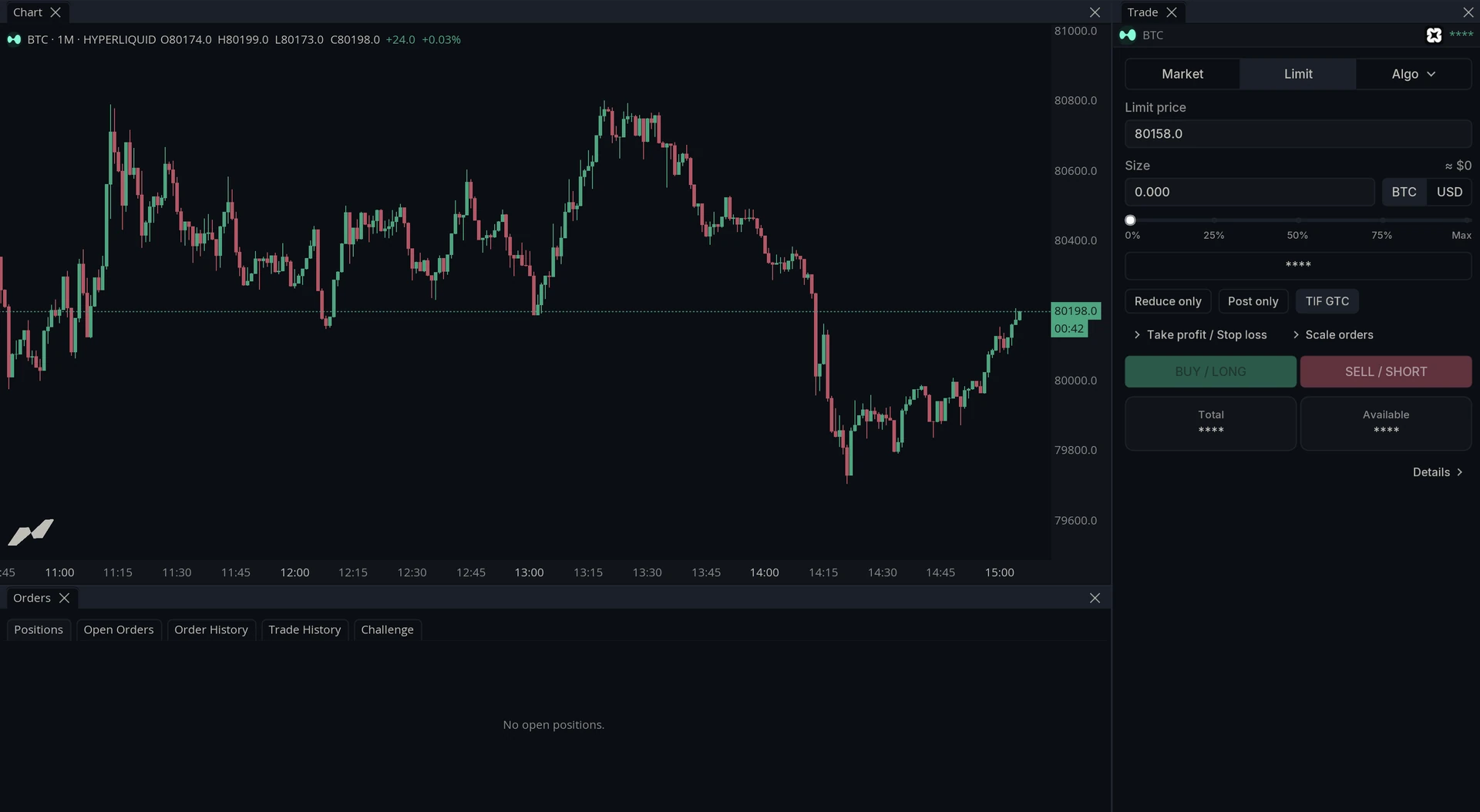
MMT routes orders to a connected provider and puts the ticket next to the chart, so a trade can be placed against the same data it was decided on. The ticket always follows the active chart’s market, and the Orders panel keeps positions, working orders and history alongside it.
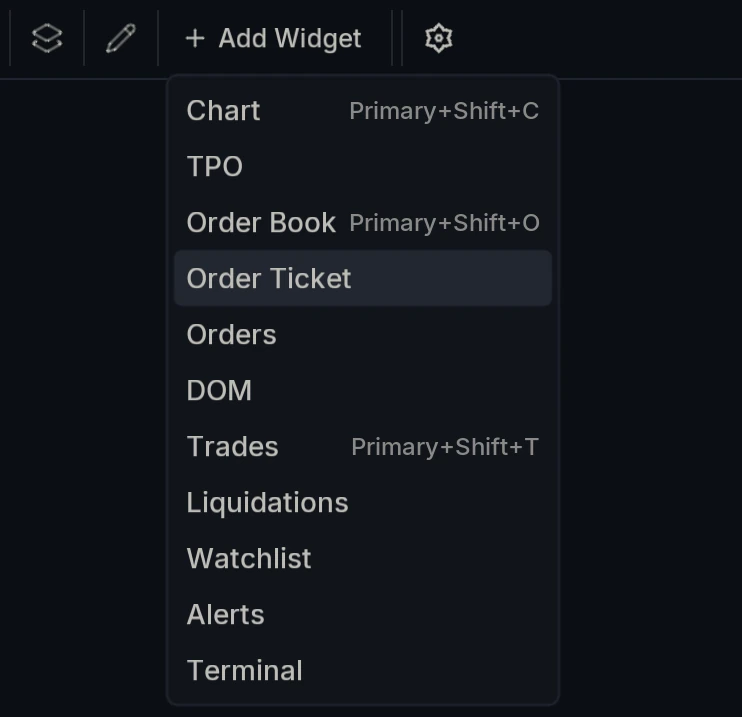
How do you open the ticket?
Two ways. Open Add Widget and choose Order Ticket and Orders.
Or use the Trade dropdown at the top right of the toolbar, which carries Order ticket and Orders along with the account controls.
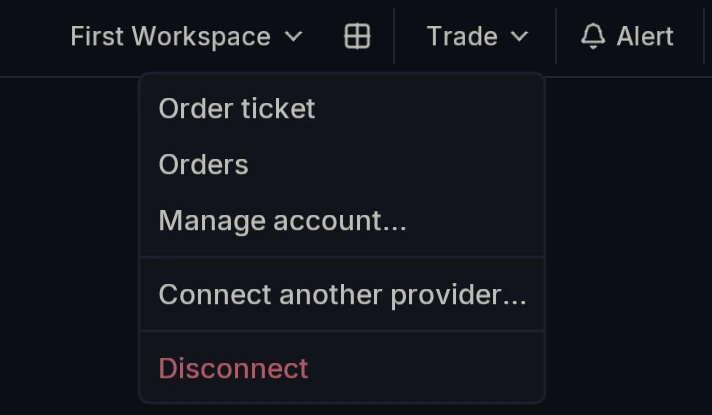
Either way the ticket is bound to the market on the active chart. Change the chart and the ticket follows, so there is no second symbol to keep in sync.
How do you connect a provider?
MMT does not hold funds. It routes your orders to a venue you connect, and Connect another provider opens the chooser.
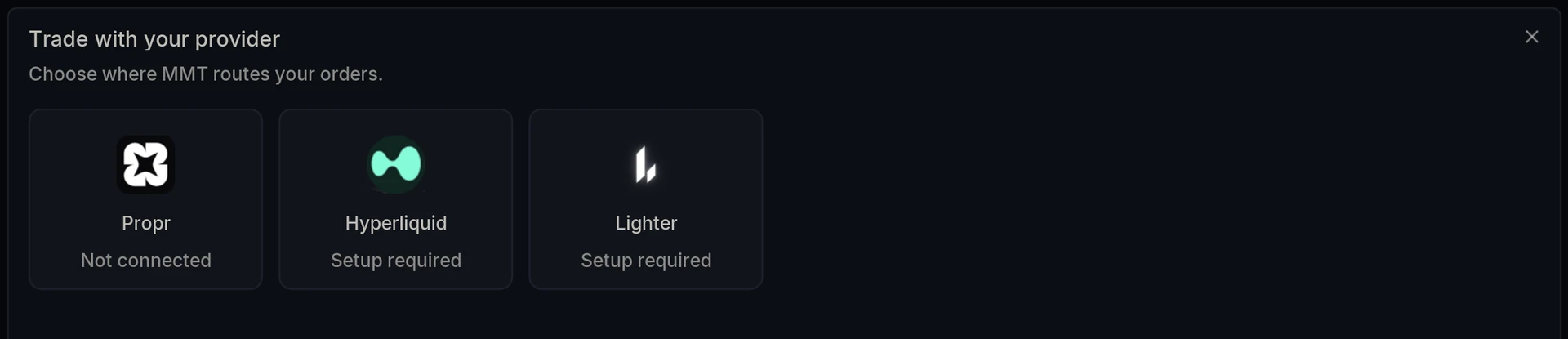
Propr, Hyperliquid and Lighter are supported today, and more are being added. Each card shows its current state, so Setup required means the provider is available but not yet configured on your account.
Manage account and Disconnect in the Trade menu handle the connection once it exists.
How do you place a market order?
Market fills immediately at whatever the book offers.
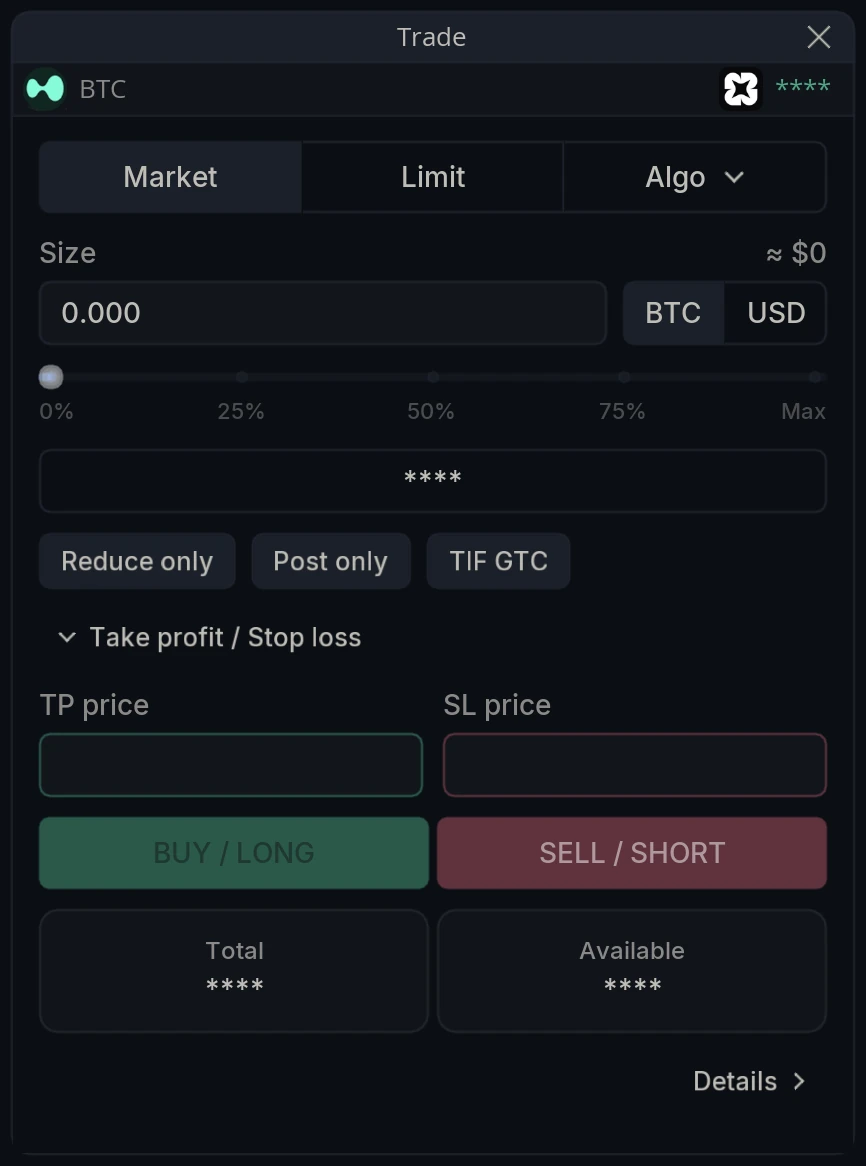
Size takes a figure in the base coin or in USD, and the slider underneath sets it as a percentage of what is available, from 0% to Max.
Three flags sit below it. Reduce only stops the order from opening or increasing a position, so it can only close one. Post only requires the order to rest rather than take. TIF GTC is the time in force, good until canceled.
Take profit / Stop loss expands to give TP price and SL price, which attach an exit to the order as it is placed rather than leaving you to add one afterward.
BUY / LONG and SELL / SHORT send it.
How do you place a limit order?
Limit adds a Limit price above the size field. Everything else behaves as it does on a market order.
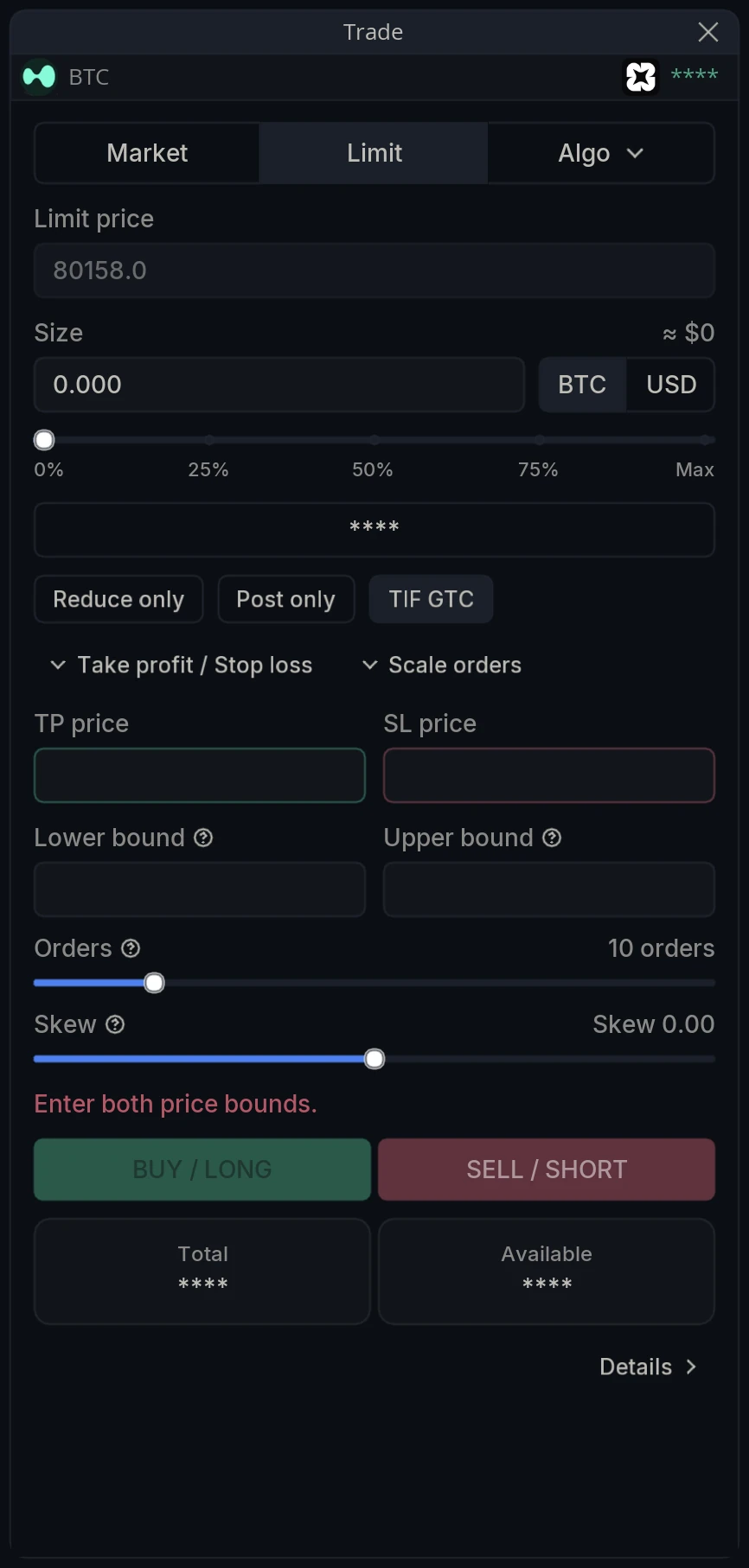
Scale orders is the second expandable section, and it turns one order into a ladder. Lower bound and Upper bound set the price range, and the two sliders shape what happens inside it:
Orders - Number of limit orders spread between the bounds.
Skew - Weights order sizes toward one end: negative concentrates size at the lower bound, positive at the upper, zero splits evenly.
A ladder is the practical answer to not knowing exactly where a level is. Rather than committing to a single price and being wrong by a few ticks, the position is built across a band, and the average entry is what matters rather than any individual fill.
Skew is what turns that band into an opinion. At zero the ladder is neutral and the average entry sits in the middle of the range. Weighted toward the lower bound, most of the size only fills if price comes all the way down, so the average entry improves but less of the order is likely to fill at all. That is the same trade-off a single limit order makes, spread across a range instead of decided at one price.
What is a chase order?
Algo on the third tab opens the execution algorithms. Chase works an order passively while following the book.
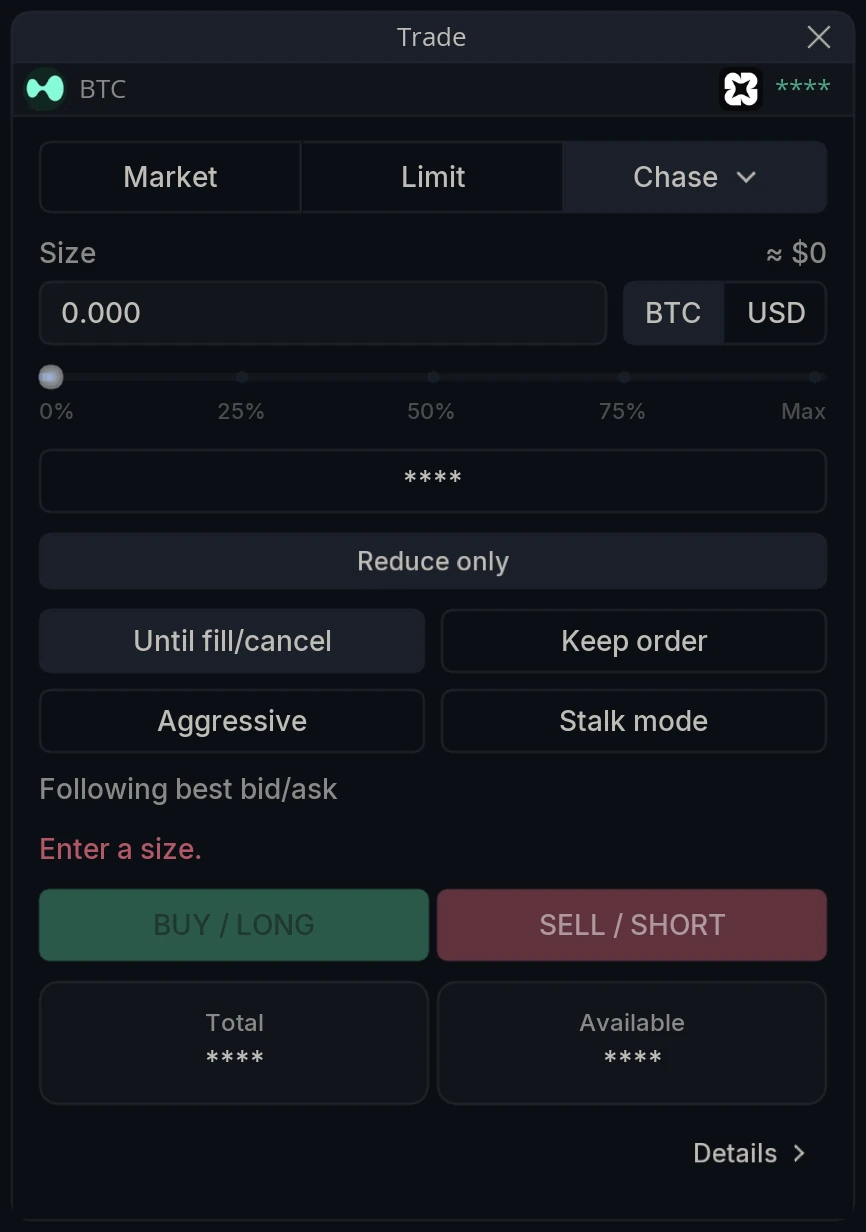
The status line under the buttons reports what the job is doing, reading Following best bid/ask by default.
Four toggles shape it, and the tooltips state each one exactly:
Until fill/cancel - Chase with no price guardrail until the order fills or you cancel the job.
Keep order - When the job stops at the guardrail, leave the resting order on the book instead of cancelling it.
Aggressive - Follow one tick inside the opposite quote instead of the passive best bid/ask, still post-only.
Stalk mode - Rest a fixed distance behind the passive quote instead of at it.
Those last two are the two directions you can lean. Aggressive buys queue position at a slightly worse price and still never takes. Stalk mode does the opposite, sitting back from the quote so the order is filled only if the market comes to it.
What is a TWAP order?
TWAP splits the order into slices and works them across a period.
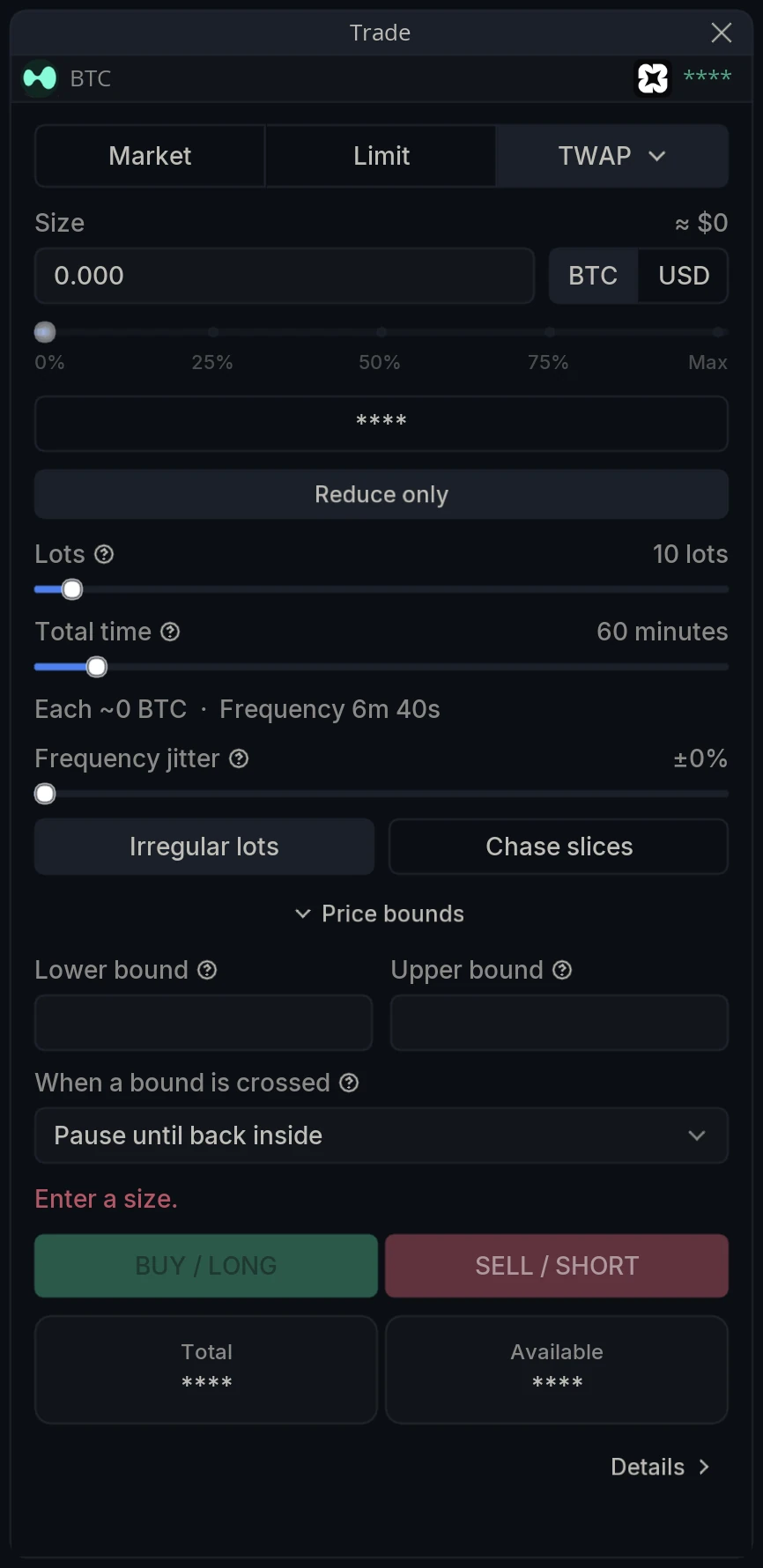
Lots is the number of slices the total size is split into, and Total time is the total duration of the schedule; slices are spread evenly across it. The line between them resolves both into the actual plan, reading Each ~0 BTC · Frequency 6m 40s so the schedule is visible before it starts.
Three controls exist to make that schedule less obvious to anyone watching it:
Frequency jitter - Each interval independently varies by up to ± this percentage, making slice timing less predictable.
Irregular lots - Randomize slice sizes instead of splitting the total into equal lots.
Chase slices - Work each slice as a post-only chase order that follows the book instead of crossing at market.
The first two matter more than they look. A schedule that fires the same size every 6 minutes 40 seconds is a pattern, and patterns on the tape get traded against. Varying both the size and the timing makes the order look like ordinary activity.
Price bounds is the safety rail. Lower bound and Upper bound mean execution only proceeds while price stays inside the bounds; leave empty for no bound, and When a bound is crossed decides what happens if it does: pause until it returns, abort the job, execute the remainder immediately, or close the position. The four options are Pause until back inside, Abort, Execute the rest now and Close position.
This is where a TWAP stops being risky. A schedule running for an hour with no bounds will keep buying through anything; the same schedule with a lower bound stops when the market breaks.
What does the Orders panel show?
Orders carries five tabs. Positions is what you currently hold. Open Orders is what is working and has not filled. Order History and Trade History are the record of what was sent and what actually executed. Challenge shows the challenge overview when the connected account is a prop account.
Trading Settings
Trading has its own tab in the main Settings dialog, covering both the ticket and the execution overlays drawn on the chart.
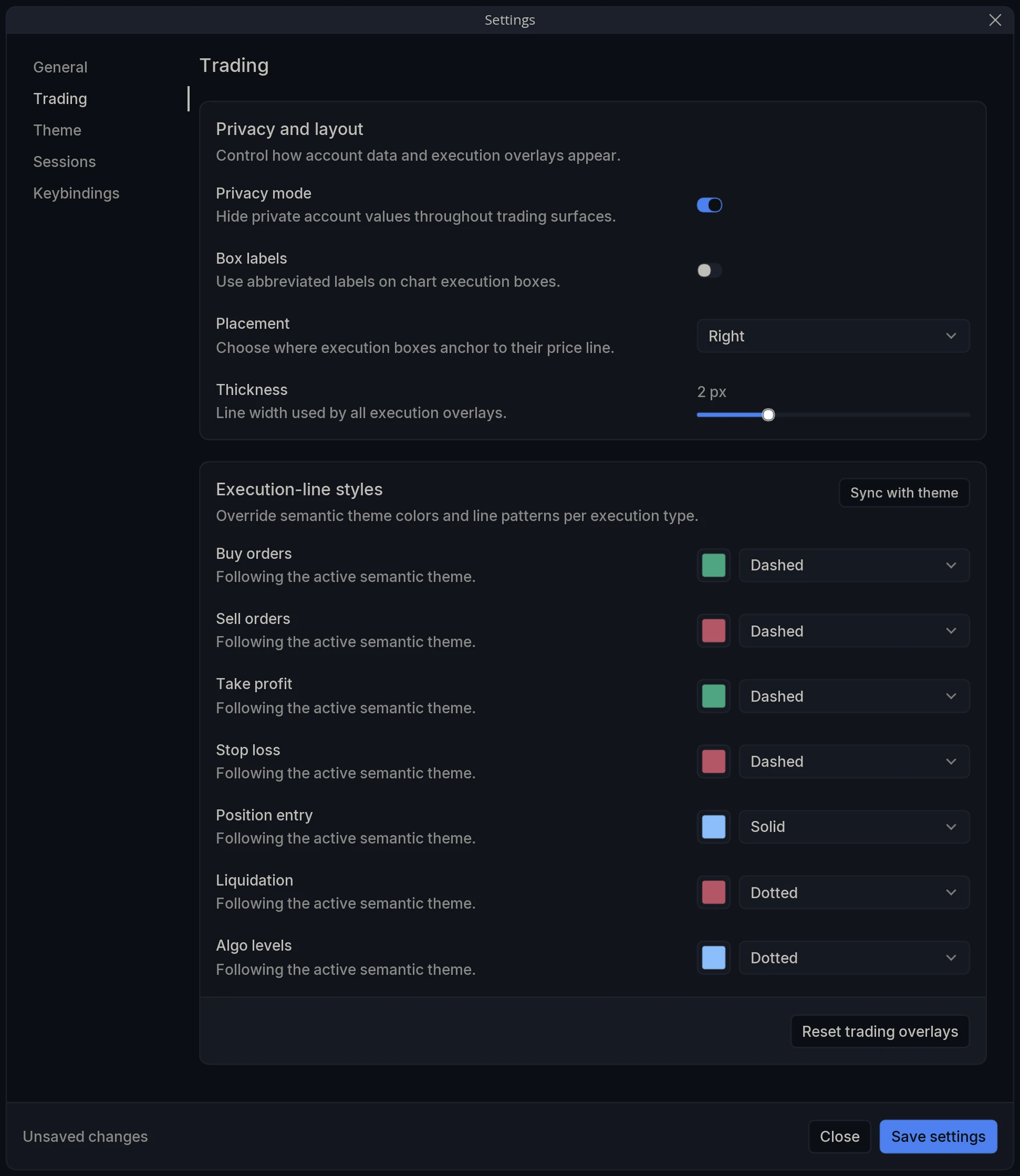
Privacy and layout
Privacy mode - Hide private account values throughout trading surfaces. This is why the balances read as asterisks in the captures on this page.
Box labels - Use abbreviated labels on chart execution boxes.
Placement - Choose where execution boxes anchor to their price line.
Thickness - Line width used by all execution overlays.
Execution-line styles
Override semantic theme colors and line patterns per execution type. Each row carries a color swatch and a pattern, and each reads Following the active semantic theme until you change it.
Sync with theme - Return every execution line to the active theme’s colors.
Buy orders / Sell orders - Your working orders on each side. Dashed by default.
Take profit / Stop loss - The exits attached to a position. Dashed by default.
Position entry - The line marking where the position was opened. Solid by default, which is what separates it at a glance from the orders around it.
Liquidation - The price the position would be closed at by the exchange. Dotted by default.
Algo levels - The bounds and working levels of a running Chase or TWAP job. Dotted by default.
Reset trading overlays - Return every setting on this tab to its default.
The defaults are worth leaving alone until you have a reason. Solid for the entry, dashed for the orders and dotted for the levels you did not choose yourself is a hierarchy, and it means a glance at the chart tells you what is a fact, what is an instruction and what is a consequence.